> ## Documentation Index
> Fetch the complete documentation index at: https://factory-changelog-jun24.mintlify.site/llms.txt
> Use this file to discover all available pages before exploring further.
# Software Factory
> Use Software Factory to manage the automations that cover your software delivery lifecycle.
Software Factory is a 24/7 autonomous system that connects AI agents across the software development lifecycle, from intake and triage through planning, execution, validation, shipping, monitoring, and recurring automation.
Software Factory is in private preview. To request access, fill out the form at [factory.ai/contact](https://factory.ai/contact) or contact your Factory account team.
 ## What Software Factory is
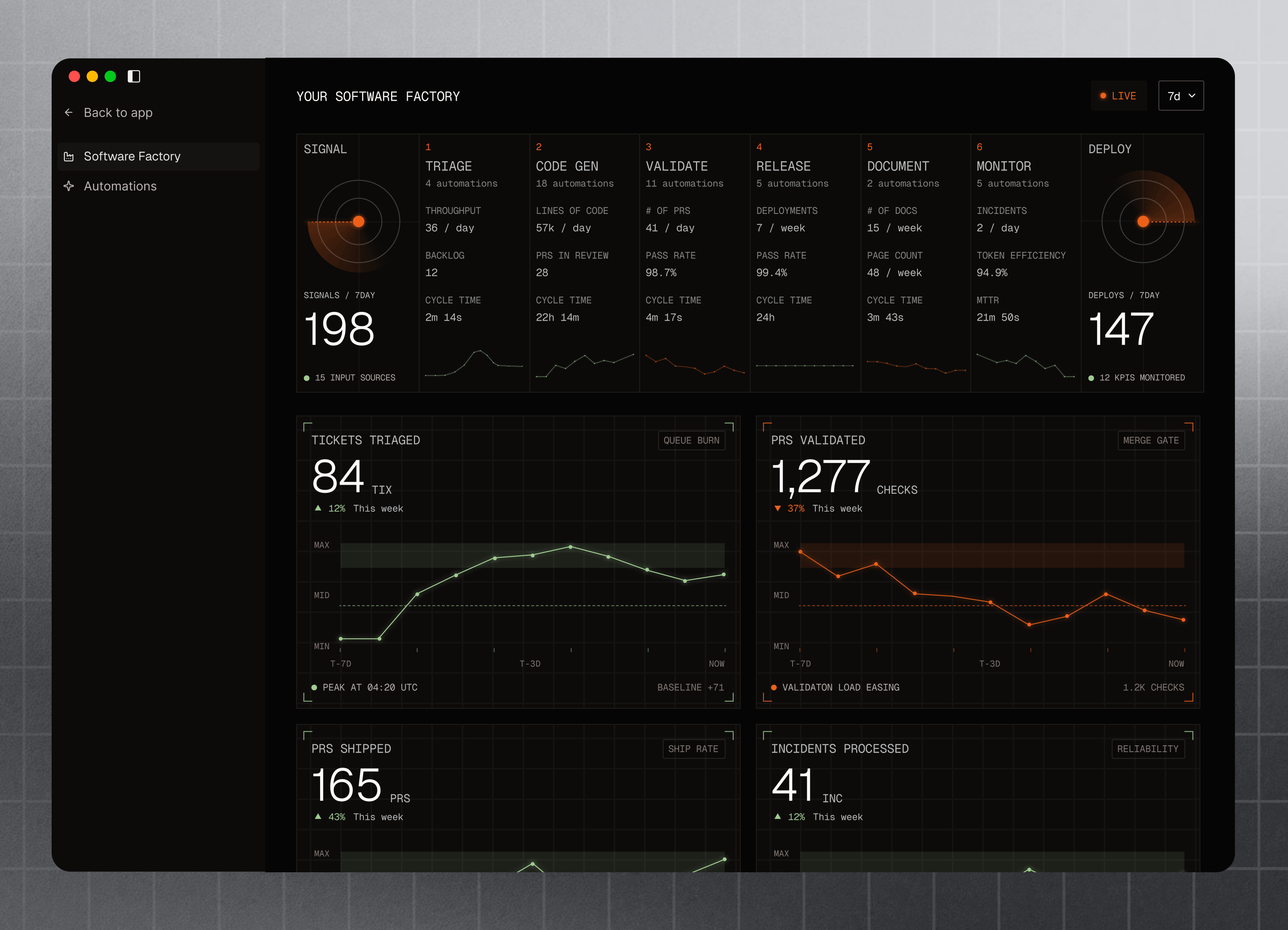
In the Factory App, Software Factory gives teams one place to track that system: live metrics, connected integrations, repository coverage, stage health, and persistent automations.
| Stage | What it covers |
| ------------ | ---------------------------------------------------------------------------- |
| **Triage** | Classify inbound work, reduce duplicates, and route items. |
| **Code-gen** | Connect requests from Slack or issue trackers to implementation sessions. |
| **Validate** | Run code review, security review, and QA before merge. |
| **Release** | Track deployment gates and ship workflows as they become available. |
| **Document** | Keep repository knowledge current with AutoWiki. |
| **Monitor** | Connect incidents, alerts, and agent effectiveness back to engineering work. |
### When to use Software Factory
Use Software Factory as a centralized view into product health across your software delivery lifecycle:
* Which SDLC stages already have automation coverage.
* Which repositories, integrations, or stages need setup.
* Whether review, QA, docs, triage, and incident workflows are healthy.
* How much work Factory processed over time.
## Manage coverage across the SDLC
Open [**Software Factory**](https://app.factory.ai/software-factory) to see your delivery lifecycle as an automation coverage map. Each stage shows what is already connected, what is healthy, and where to add coverage next.
Use the dashboard to:
* Switch between different time ranges.
* Scan impact metrics and stage health.
* Filter by integration, including GitHub, Slack, Linear, and GitLab.
* Open a stage to review templates, automations, and covered repositories.
* Create missing automations from the stage detail page or the [Automations](/web/automations) page.
Repo-backed stages show repository coverage, so you can see which repos are covered by workflows like **Code Review**, **QA**, **Security Audit**, and **AutoWiki**.
| Stage | Templates and setup | Coverage shown |
| ------------ | -------------------------------------- | -------------------------------- |
| **Triage** | Triage | Intake automation coverage |
| **Code-gen** | Slack and Linear delegation | Integration coverage |
| **Validate** | Code Review, QA, Security Audit | Repository coverage |
| **Release** | Release workflows as available | Release status |
| **Document** | AutoWiki | Repository coverage |
| **Monitor** | Incident Response, Agent Effectiveness | Incident and efficiency coverage |
## Metrics and coverage
### Automation metrics
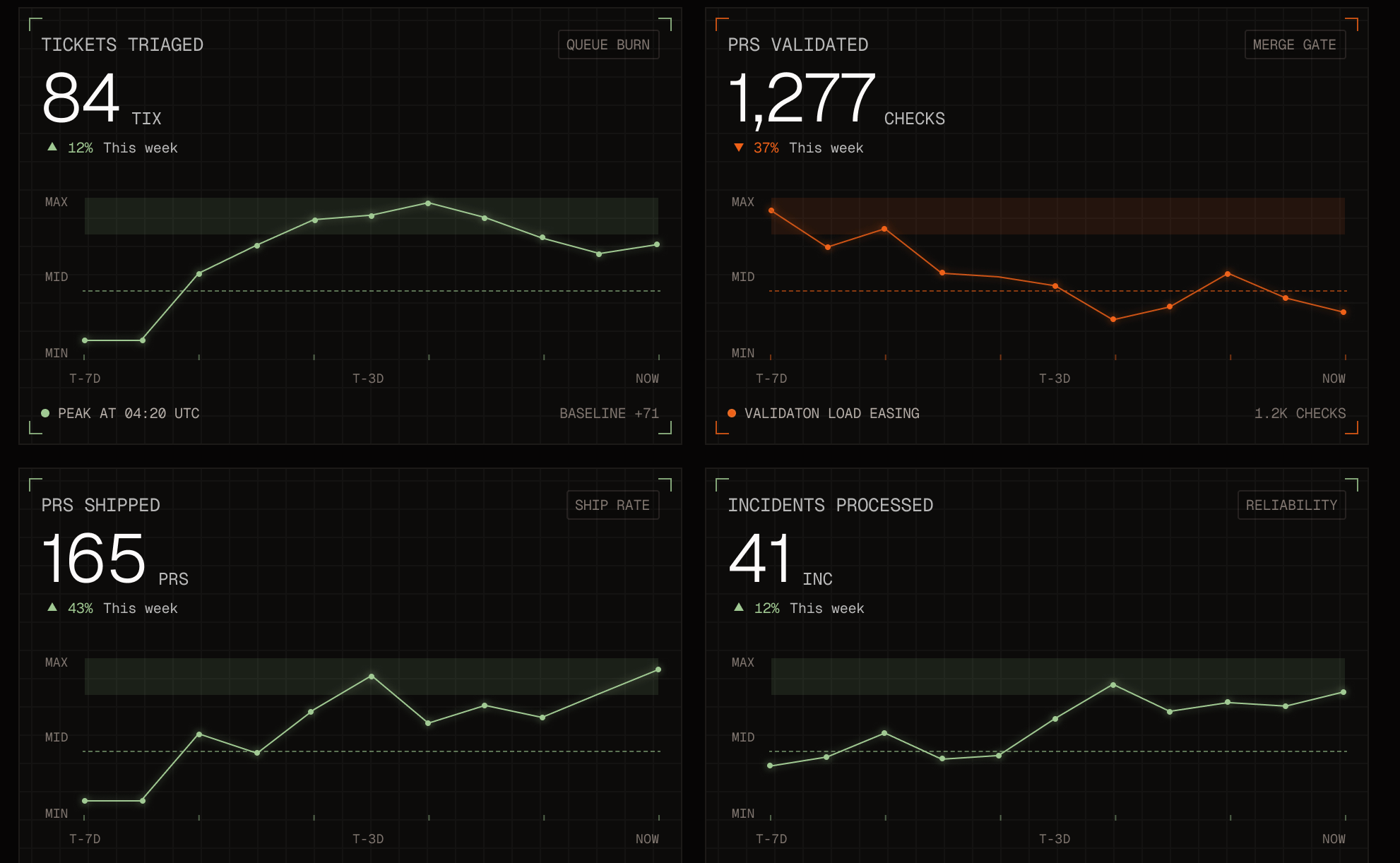
Software Factory gives you a live view of automation impact across the SDLC with metrics such as:
## What Software Factory is
In the Factory App, Software Factory gives teams one place to track that system: live metrics, connected integrations, repository coverage, stage health, and persistent automations.
| Stage | What it covers |
| ------------ | ---------------------------------------------------------------------------- |
| **Triage** | Classify inbound work, reduce duplicates, and route items. |
| **Code-gen** | Connect requests from Slack or issue trackers to implementation sessions. |
| **Validate** | Run code review, security review, and QA before merge. |
| **Release** | Track deployment gates and ship workflows as they become available. |
| **Document** | Keep repository knowledge current with AutoWiki. |
| **Monitor** | Connect incidents, alerts, and agent effectiveness back to engineering work. |
### When to use Software Factory
Use Software Factory as a centralized view into product health across your software delivery lifecycle:
* Which SDLC stages already have automation coverage.
* Which repositories, integrations, or stages need setup.
* Whether review, QA, docs, triage, and incident workflows are healthy.
* How much work Factory processed over time.
## Manage coverage across the SDLC
Open [**Software Factory**](https://app.factory.ai/software-factory) to see your delivery lifecycle as an automation coverage map. Each stage shows what is already connected, what is healthy, and where to add coverage next.
Use the dashboard to:
* Switch between different time ranges.
* Scan impact metrics and stage health.
* Filter by integration, including GitHub, Slack, Linear, and GitLab.
* Open a stage to review templates, automations, and covered repositories.
* Create missing automations from the stage detail page or the [Automations](/web/automations) page.
Repo-backed stages show repository coverage, so you can see which repos are covered by workflows like **Code Review**, **QA**, **Security Audit**, and **AutoWiki**.
| Stage | Templates and setup | Coverage shown |
| ------------ | -------------------------------------- | -------------------------------- |
| **Triage** | Triage | Intake automation coverage |
| **Code-gen** | Slack and Linear delegation | Integration coverage |
| **Validate** | Code Review, QA, Security Audit | Repository coverage |
| **Release** | Release workflows as available | Release status |
| **Document** | AutoWiki | Repository coverage |
| **Monitor** | Incident Response, Agent Effectiveness | Incident and efficiency coverage |
## Metrics and coverage
### Automation metrics
Software Factory gives you a live view of automation impact across the SDLC with metrics such as:
 | Metric | What it indicates |
| ----------------------- | -------------------------------------------------------------------- |
| **Tickets Triaged** | Tickets classified, deduplicated, or routed by triage workflows. |
| **PR Validations** | QA and code review checks run against pull requests. |
| **PRs Merged** | Pull requests merged in the selected time range. |
| **Incidents Processed** | Incidents, errors, or alerts handled by incident-response workflows. |
Use these metrics to see where automation is moving work forward and where your team may need more coverage.
### Health and coverage
Use health and coverage to spot where Software Factory is ready to run and where setup is missing.
* **Health** shows whether a stage has the integrations and automations it needs.
* **Coverage** shows where those automations apply, such as which repositories are covered for **Validate** or **Document**.
If something is missing, open the stage to connect the integration, add the repo or channel, or create the expected automation.
| Metric | What it indicates |
| ----------------------- | -------------------------------------------------------------------- |
| **Tickets Triaged** | Tickets classified, deduplicated, or routed by triage workflows. |
| **PR Validations** | QA and code review checks run against pull requests. |
| **PRs Merged** | Pull requests merged in the selected time range. |
| **Incidents Processed** | Incidents, errors, or alerts handled by incident-response workflows. |
Use these metrics to see where automation is moving work forward and where your team may need more coverage.
### Health and coverage
Use health and coverage to spot where Software Factory is ready to run and where setup is missing.
* **Health** shows whether a stage has the integrations and automations it needs.
* **Coverage** shows where those automations apply, such as which repositories are covered for **Validate** or **Document**.
If something is missing, open the stage to connect the integration, add the repo or channel, or create the expected automation.