> ## Documentation Index
> Fetch the complete documentation index at: https://factory-changelog-jun24.mintlify.site/llms.txt
> Use this file to discover all available pages before exploring further.
# Factory Missions
> Use Factory Missions to plan and execute large, multi-feature projects with structured orchestration. Describe your goal, collaborate on the plan, and let Droid manage the work.
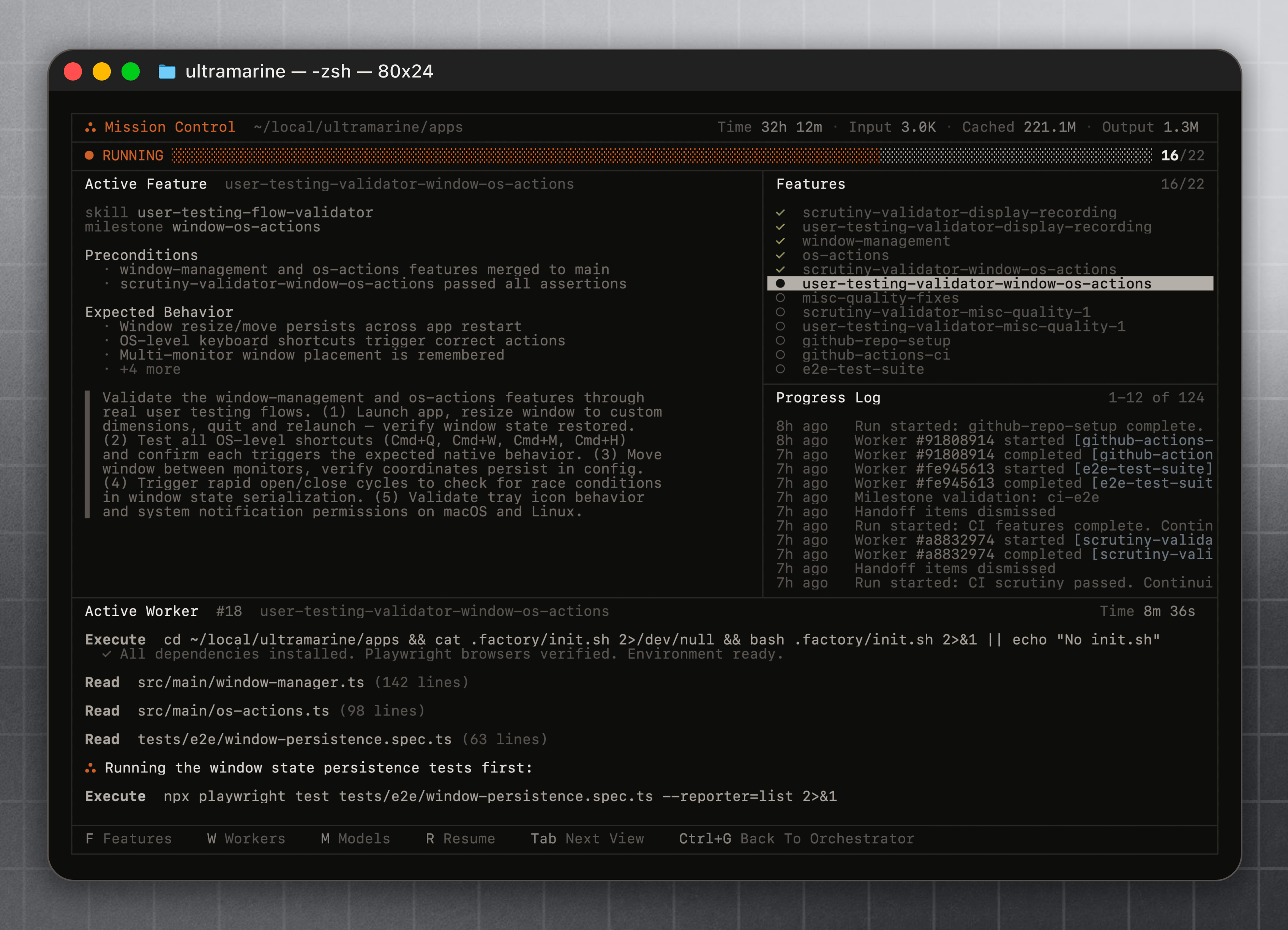 ## What Missions do
Factory Missions are structured workflows for taking on large, multi-feature work with Droid. Instead of tackling everything in a single session, you collaborate with Droid upfront to build a plan -- features, milestones, and the skills needed to accomplish each part -- then hand off execution to an orchestration layer that manages the work.
Access Missions with the `/missions` command (also available via `/mission`).
Work with Droid to define features, milestones, and success criteria before any code is written.
Existing skills are leveraged and new specialized skills are developed for each part of the work.
Mission Control manages execution across agents, tracking progress through your plan.
MCP integrations, skills, hooks, and custom droids all work inside Missions.
## For optimal outcomes
For the best results, your repository should be at [Agent Readiness](/web/agent-readiness/overview) **Level 4 (Optimized) or above**.
As a mission works, it runs user-facing QA testing against your application to validate each feature and self-correct as it goes. For this to work in an existing project, your codebase needs an automated, scriptable way to exercise the app the way a user would (for example, a script to stand up or mock all dependencies of the app to simulate all potential user flows). Without it, the mission cannot reliably verify its own work.
Not there yet? Re-run your readiness evaluation with [`/readiness-report`](/cli/features/readiness-report), then close the gaps with [`/readiness-fix`](/cli/features/readiness-report#remediation-with-readiness-fix).
## How it works
Start by running `/missions` in any Droid session.
Droid interacts with you back and forth to understand your goal. It asks clarifying questions, probes for constraints, and works with you to define what you actually want built. This is a conversation, not a one-shot prompt.
Based on the conversation, Droid constructs a structured plan: a set of features organized into milestones. Each milestone represents a meaningful checkpoint in the work.
Droid pulls in your existing skills where they apply, and develops specialized skills for parts of the work that need them. This means the execution is tailored to your project and workflow, not generic.
Once the plan is approved, Droid enters Mission Control -- the Missions orchestration view that manages execution of the plan. You can monitor progress, see which features are being worked on, and intervene when needed.
For details on getting the plan right, see [Planning & Validation](/features/missions/planning). To run and steer an approved mission, see [Running in the CLI](/cli/features/missions/running-cli) or [Running in the Desktop/Web](/web/missions).
## What Missions are good for
We have built and tested Missions across a range of work:
* **Full-stack development** -- Building complete applications with frontend, backend, database, and deployment.
* **Research** -- Deep investigation tasks that require exploring multiple approaches, synthesizing findings, and producing structured output.
* **Brownfield migrations** -- Modernizing existing codebases, swapping frameworks, or restructuring large projects while preserving existing behavior.
* **Ambitious prototypes** -- Product experiments that need to be functional, not just sketched out.
The common thread: work that benefits from upfront planning and structured decomposition rather than ad-hoc prompting.
## Open questions
Missions are early. We are shipping this as a research preview because there are fundamental questions we are still working through:
* **Is parallelization necessary?** Running multiple agents in parallel sounds good in theory, but does it actually produce better results than sequential execution? We are testing this.
* **How do you maximize correctness?** Long-running plans accumulate errors. What validation and correction strategies work best at each stage?
* **Cost vs. quality tradeoffs** -- How aggressive should the orchestrator be? More planning and validation means higher cost but potentially better output. Where is the right balance?
We want your feedback on these. Use Missions, push the workflow hard, and tell us what works and what does not.
## See also
* [Planning & Validation](/features/missions/planning) -- Get the upfront plan right and tune validation frequency
* [Running in the CLI](/cli/features/missions/running-cli) -- Monitor, intervene, and redirect from the terminal
* [Running in the Desktop/Web](/web/missions) -- The visual Mission Control dashboard
* [Troubleshooting](/features/missions/troubleshooting) -- Recover from frozen missions, stuck workers, and blocked milestones
* [Configuration & Reference](/features/missions/reference) -- Headless execution, settings, and enterprise policy
* [Specification Mode](/cli/user-guides/specification-mode) -- For well-scoped tasks that benefit from planning before implementation
* [Implementing Large Features](/cli/user-guides/implementing-large-features) -- Manual workflow for multi-phase projects
* [Custom Droids](/cli/configuration/custom-droids) -- Build specialized subagents that Missions can use
* [Skills](/cli/configuration/skills) -- Create and manage skills that Missions can leverage
## What Missions do
Factory Missions are structured workflows for taking on large, multi-feature work with Droid. Instead of tackling everything in a single session, you collaborate with Droid upfront to build a plan -- features, milestones, and the skills needed to accomplish each part -- then hand off execution to an orchestration layer that manages the work.
Access Missions with the `/missions` command (also available via `/mission`).
Work with Droid to define features, milestones, and success criteria before any code is written.
Existing skills are leveraged and new specialized skills are developed for each part of the work.
Mission Control manages execution across agents, tracking progress through your plan.
MCP integrations, skills, hooks, and custom droids all work inside Missions.
## For optimal outcomes
For the best results, your repository should be at [Agent Readiness](/web/agent-readiness/overview) **Level 4 (Optimized) or above**.
As a mission works, it runs user-facing QA testing against your application to validate each feature and self-correct as it goes. For this to work in an existing project, your codebase needs an automated, scriptable way to exercise the app the way a user would (for example, a script to stand up or mock all dependencies of the app to simulate all potential user flows). Without it, the mission cannot reliably verify its own work.
Not there yet? Re-run your readiness evaluation with [`/readiness-report`](/cli/features/readiness-report), then close the gaps with [`/readiness-fix`](/cli/features/readiness-report#remediation-with-readiness-fix).
## How it works
Start by running `/missions` in any Droid session.
Droid interacts with you back and forth to understand your goal. It asks clarifying questions, probes for constraints, and works with you to define what you actually want built. This is a conversation, not a one-shot prompt.
Based on the conversation, Droid constructs a structured plan: a set of features organized into milestones. Each milestone represents a meaningful checkpoint in the work.
Droid pulls in your existing skills where they apply, and develops specialized skills for parts of the work that need them. This means the execution is tailored to your project and workflow, not generic.
Once the plan is approved, Droid enters Mission Control -- the Missions orchestration view that manages execution of the plan. You can monitor progress, see which features are being worked on, and intervene when needed.
For details on getting the plan right, see [Planning & Validation](/features/missions/planning). To run and steer an approved mission, see [Running in the CLI](/cli/features/missions/running-cli) or [Running in the Desktop/Web](/web/missions).
## What Missions are good for
We have built and tested Missions across a range of work:
* **Full-stack development** -- Building complete applications with frontend, backend, database, and deployment.
* **Research** -- Deep investigation tasks that require exploring multiple approaches, synthesizing findings, and producing structured output.
* **Brownfield migrations** -- Modernizing existing codebases, swapping frameworks, or restructuring large projects while preserving existing behavior.
* **Ambitious prototypes** -- Product experiments that need to be functional, not just sketched out.
The common thread: work that benefits from upfront planning and structured decomposition rather than ad-hoc prompting.
## Open questions
Missions are early. We are shipping this as a research preview because there are fundamental questions we are still working through:
* **Is parallelization necessary?** Running multiple agents in parallel sounds good in theory, but does it actually produce better results than sequential execution? We are testing this.
* **How do you maximize correctness?** Long-running plans accumulate errors. What validation and correction strategies work best at each stage?
* **Cost vs. quality tradeoffs** -- How aggressive should the orchestrator be? More planning and validation means higher cost but potentially better output. Where is the right balance?
We want your feedback on these. Use Missions, push the workflow hard, and tell us what works and what does not.
## See also
* [Planning & Validation](/features/missions/planning) -- Get the upfront plan right and tune validation frequency
* [Running in the CLI](/cli/features/missions/running-cli) -- Monitor, intervene, and redirect from the terminal
* [Running in the Desktop/Web](/web/missions) -- The visual Mission Control dashboard
* [Troubleshooting](/features/missions/troubleshooting) -- Recover from frozen missions, stuck workers, and blocked milestones
* [Configuration & Reference](/features/missions/reference) -- Headless execution, settings, and enterprise policy
* [Specification Mode](/cli/user-guides/specification-mode) -- For well-scoped tasks that benefit from planning before implementation
* [Implementing Large Features](/cli/user-guides/implementing-large-features) -- Manual workflow for multi-phase projects
* [Custom Droids](/cli/configuration/custom-droids) -- Build specialized subagents that Missions can use
* [Skills](/cli/configuration/skills) -- Create and manage skills that Missions can leverage